Yes, there is a truck driver app for almost every part of the job, and most of them cover only one part. Drivers end up juggling one app for maps, another for parking, and a third for jobs, with no place to talk to other drivers.
A good trucking app puts truck-focused navigation, jobs that fit how you want to drive, and a driver community in one place. This guide lists what to look for, with a checklist you can use before you download anything.
| TL;DR 1. Yes. There is a truck driver app for navigation, parking, jobs, and community, but most apps cover only one of those. 2. A good trucking app combines truck-focused maps, jobs with pay shown up front, and a driver community. 3. Before you download, check offline maps, how parking and weigh station updates are reported, and whether your profile is used for job matching. 4. FreightPro puts jobs, maps, and community in one app for CDL-A, CDL-B, and CDL-C drivers. |
Is there an app for truck drivers? Yes, and the good ones cover five jobs
Yes. Trucking apps exist for navigation, truck stop and parking information, weigh station updates, job search, and driver community. Most cover one or two of these. The most useful trucking app combines the ones you open every shift, so you set up and check fewer apps before you roll.
What should a good trucking app include?
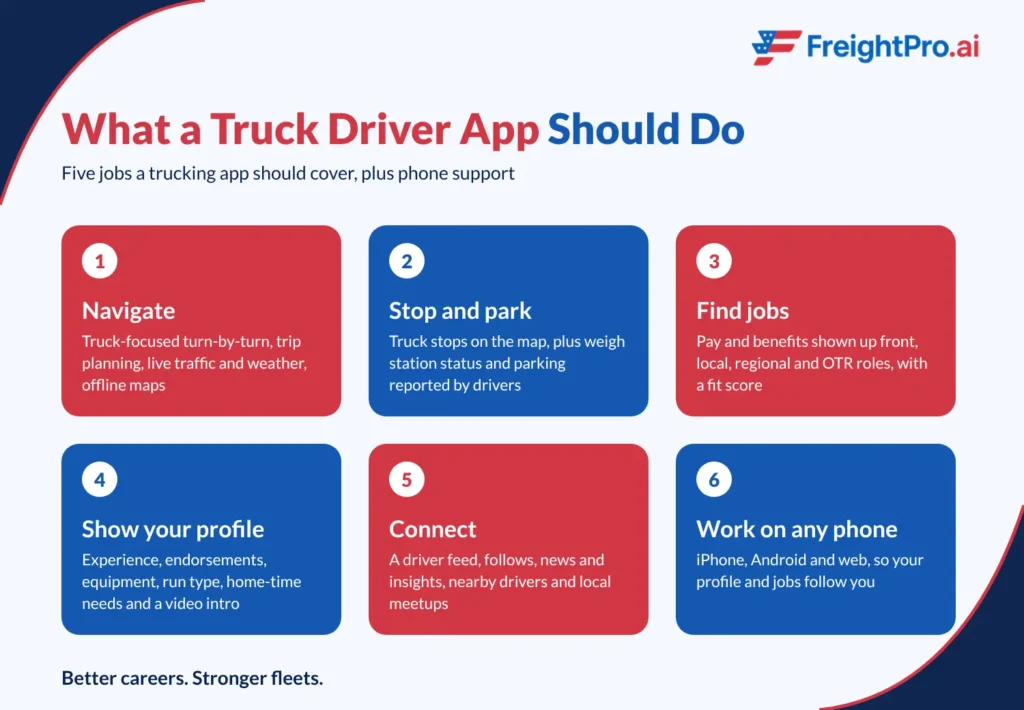
A good trucking app includes truck-focused navigation, driver-reported stop and parking information, jobs with pay shown up front, a profile that supports matching, and a community feed. It also works on your phone, with offline access for dead zones.
Use the checklist below to compare any app you are considering.
1. Does it have truck-focused navigation and trip planning?
A car GPS routes you as if you were driving a car. Look for truck-focused turn-by-turn directions, multi-day trip planning, break planning, live traffic, and live weather. Offline maps matter on long stretches with no signal.
Always confirm restrictions on your route against your company guidance and posted signs. No app replaces that check.
2. Does it show truck stops, parking, and weigh station status?
Truck stops on the map, and driver-reported updates save you from circling for a spot at the end of your hours. Weigh station status and parking availability are only as good as the latest report, so look for a timestamp or a recent update.
Parking pressure is a real part of the job, and limited parking and poor roadside amenities are listed among the lifestyle factors that make trucking harder to stay in.
3. Does it work as a mobile app for truck drivers on any phone?
Check that the app runs on iPhone and Android, and ideally on the web too, so your profile and saved jobs follow you to a laptop at home. Set up your account, routes, and saved stops while you are parked, not while you are driving.
4. Does it show pay and benefits before you apply?
A job listing without pay or home time tells you very little. Look for pay and benefits up front, a clear run type (local, regional, or OTR), and enough detail to know whether the job fits your life.
Carriers compete on pay, sign-on bonuses, benefits, and home time, so compare each of those line by line. How carriers compete to attract qualified drivers shows what those offers usually cover.
Vague job requirements are a known cause of mismatched hires, which is why detailed listings and a fit score are worth looking for.
5. Does it include a driver community, not only a job list?
Look for a feed you can follow, news and insights, and a way to find drivers near you. A trucking app with a community gives you a reason to open it between jobs, and a place to hear what other drivers are seeing on the road.
Trucking app checklist
| Feature | What to look for | Why it matters |
| Truck-focused navigation | Turn-by-turn, multi-day trip planning, break planning | Plans the whole run, not only the next turn |
| Live traffic and weather | Updates along your route | Lets you adjust before you are stuck |
| Offline maps | Maps that work without signal | Keeps you on route in dead zones |
| Truck stops and parking | Stops on the map, parking availability | Helps you plan where to end your hours |
| Weigh station status | Driver-reported status with a recent update | Helps you plan ahead for the next stop |
| Jobs with pay up front | Pay, benefits, run type, and home time listed | Lets you compare jobs without guessing |
| Profile and matching | Experience, endorsements, equipment, fit score | Shows jobs that fit how you want to drive |
| Community | Feed, follows, nearby drivers, meetups | Connects you with drivers who know the road |
| Phone support | iPhone, Android, and web | Your account follows you across devices |
How do you get better job matches from a trucking app?
Fill in your profile completely: experience, endorsements, equipment, run type, pay, and home-time needs. Matching can only compare what it can see. A complete profile gives it more to work with.
- Add your driving experience and the equipment you have run, such as dry van, reefer, flatbed, or tanker.
- List your endorsements, such as Hazmat, Tanker, or Doubles/Triples.
- Choose the run type you want: local, regional, OTR, or dedicated.
- Set your pay and home-time expectations so jobs are compared against them.
- Add a video introduction if the app supports one.
- Read the fit score on each job, then compare pay and benefits side by side before you apply.
How can you tell a weak trucking app from a good one?
A weak trucking app hides what you need to judge it. Read the app store listing and the first few screens before you create an account or grant permissions.
- Jobs are listed without pay, benefits, or run type.
- Parking or weigh station reports carry no date, or you cannot tell where they came from.
- Navigation does not say whether it is built for trucks.
- The listing says free to download but never mentions in-app purchases.
- Permission requests have nothing to do with maps, jobs, or your profile.
One of these alone does not settle it. Two or three together are a reason to keep looking.
How do you test a trucking app before you rely on it?
Test it while you are parked, on a lane you already know. That gives you something to compare against.
- Build a route for a lane you have run and see whether the trip plan matches what you know about the road.
- Open three jobs and check whether pay, benefits, and run type are all visible.
- Read a parking or weigh station report and check how recent it is.
- Find the offline map setting and confirm it works before your next long run.
What does FreightPro offer as a truck driver app?
FreightPro is a trucking ecosystem for CDL drivers. Jobs come first, with truck-focused maps, truck stops, and a driver community in the same app. It is built for CDL-A, CDL-B, and CDL-C drivers.
Jobs and AI matching
- AI-powered matching compares your profile with jobs on the platform and shows a fit score on each one.
- Pay and benefits are shown up front, across local, regional, and OTR jobs.
- 500+ new jobs every month.
- Quick apply, plus a rich profile and video introduction that show carriers who you are.
- Visibility to 1000’s of quality carriers.
Maps and truck stops
- Truck-focused turn-by-turn navigation and multi-day trip planning.
- Live traffic and weather, offline maps, and break planning.
- Truck stops on the map, plus weigh station status and truck parking availability reported by drivers.
Truckers community
- A social feed with posts and short videos from drivers.
- Follows for drivers, owner-operators, and companies, plus news and insights.
- Meet to see drivers nearby and local meetups.
The app is free to download on iPhone and Android, and also available on the web.

Which trucking app should you download first?
Start with the app that covers what you use every week, then fill the gaps. If you want jobs, maps, and a driver community without switching screens, look for a trucking app that combines them, and test it against the checklist above.
Questions about FreightPro? Contact the FreightPro team and ask before you download.
Frequently asked questions
1. Is there a mobile app for truck drivers who work local CDL-B routes?
Yes. FreightPro is a mobile app for truck drivers across CDL-A, CDL-B, and CDL-C, with local, regional, and OTR jobs. Set your run type and home-time needs in your profile so matching reflects local work. Which roles appear depends on your area, so check the job list in your region.
2. Do trucking apps work offline when I lose cell signal?
Some do. Offline maps keep you navigating without signal, but live traffic, weather, and driver-reported updates need a connection. FreightPro includes offline maps. Check how any trucking app handles offline use before you rely on it, and set up your route while you still have signal.
3. Is it legal to use a trucking app while I am driving?
Only hands-free. FMCSA rules bar commercial drivers from holding a phone to make a call or dialing with more than one button. A mounted phone within reach, an earpiece, or voice commands are allowed. Driver fines reach $2,750, so plan routes and browse jobs while parked.
4. How accurate are parking and weigh station updates in a trucking app?
They are as accurate as the latest driver report. Parking availability and weigh station status come from other drivers, so conditions can change before you arrive. Treat the updates as a planning guide, check how recent the report is, and keep a backup stop in mind.
5. Do I have to pay to use a trucking app?
Not always. Many trucking apps are free to download, but some charge for premium tools or include in-app purchases. FreightPro is free to download. Read the app store listing for in-app purchases before you install, and compare what any paid tier adds to the free version.
6. Can I meet other drivers near me through a trucking app?
Yes, if the app has a nearby-drivers feature. FreightPro includes Meet, which shows drivers nearby and local meetups. Who you find depends on where you are and how many drivers use the app in your area, so open it in your region and see.