Truck driver resources are scattered across government sites, app stores and forums, and most lists hand you a dozen links with no sense of which one to open first.
This guide groups them by the job each one does: official rules and paperwork, apps for the road, websites for pay and safety, and a CDL driver checklist. Every rule links to FMCSA, DOT, or BLS, and every app is described by what it does. Save it once, and you will know where to go for the next rule question, route problem, or job search.
| TL;DR 1. The truck driver resources worth saving fall into four groups: official FMCSA pages, apps for routes, weigh stations and parking, websites for pay and safety data, and a short CDL driver checklist. 2. FMCSA’s driver resources page links the CDL program, entry-level driver training, medical forms, hours-of-service rules, the Drug and Alcohol Clearinghouse, and the complaint channels in one place. 3. Match each tool to a job: route and weigh station apps for the day, official sites for rules and paperwork, and a jobs and community app for what comes next. 4. This guide covers CDL-A, CDL-B, and CDL-C drivers. |
What are the best truck driver resources for CDL drivers?
Truck driver resources are the official sites, apps, and communities that help a CDL driver stay compliant, stay on route, and find better work. The most useful ones each solve one specific problem, so match the resource to the need using the table below.
| If you need… | Go to | Section |
| Licensing, training or medical forms | FMCSA CDL program | Official resources |
| Hours-of-service rules or an ELD check | FMCSA hours of service | Official resources |
| Drug and alcohol violation or return-to-duty information | Drug and Alcohol Clearinghouse | Official resources |
| To report coercion, a safety problem or fraud | FMCSA complaint system (NCCDB) | Official resources |
| Weigh stations, parking, fuel and traffic | Truck driver apps | Apps |
| Pay and job outlook | BLS Occupational Outlook Handbook | Websites |
| Jobs and other drivers | FreightPro app | FreightPro |
Which official CDL resources should every driver bookmark?
Start with FMCSA’s driver resources page. It links the CDL program, entry-level driver training, medical examination forms, military driver programs, hours-of-service rules, the Drug and Alcohol Clearinghouse, and the main complaint channels in one place.
- CDL resources for licensing, training, and medical forms
FMCSA’s CDL program page explains the federal licensing standards, and your state licensing agency issues the license itself. New drivers can read the entry-level driver training requirements before choosing a school.
Medical certification forms sit on FMCSA’s medical forms page. Veterans can start with the military driver programs page. These CDL resources apply whether you drive Class A, B or C.
| Class | What it covers | Typical vehicles |
| CDL-A | Combination vehicles with a gross combination weight rating of 26,001 pounds or more, where the towed vehicle is over 10,000 pounds | Tractor-trailers, tankers, flatbeds |
| CDL-B | A single vehicle with a gross vehicle weight rating of 26,001 pounds or more | Straight trucks, box trucks, dump trucks, buses |
| CDL-C | A vehicle that does not meet Class A or B but carries 16 or more passengers or hazardous materials requiring placards | Passenger and hazmat vehicles |
- Hours of service rules and the registered ELD list
FMCSA’s hours-of-service page sets an 11-hour driving allotment inside a 14-hour driving window. A break of at least 30 consecutive minutes is required after 8 cumulative hours of driving, and the sleeper berth provision lets you split your 10 off-duty hours into at least 7 hours in the berth and at least 2 hours off duty.
For the 60- and 70-hour limits and the 34-hour restart, use FMCSA’s summary of the hours-of-service regulations.
An ELD syncs with the engine to record driving time automatically, and FMCSA says the rule does not change the basic hours-of-service rules. FMCSA also publishes the list of self-certified and registered ELDs so you can confirm a device is on it.
- Drug and Alcohol Clearinghouse
A carrier needs your consent before it can view your record in the Clearinghouse. If you do not consent to a query, you are prohibited from performing safety-sensitive functions for the employer that requested it.
After a drug or alcohol program violation, you cannot perform safety-sensitive functions for any DOT-regulated employer until you complete the return-to-duty process. If you believe your data is inaccurate, you can submit a DataQs petition or request a correction under the Privacy Act.
- Where to file a safety, coercion, or fraud complaint
Safety complaints go through FMCSA’s online complaint system, the NCCDB. Coercion complaints must be in writing and filed within 90 days, either through the NCCDB or by mail to the FMCSA Division Office in the state where you work, per FMCSA’s coercion page.
Include texts, emails, and the names of any witnesses. For retaliation over safety concerns, FMCSA points drivers to the OSHA whistleblower program. Criminal activity goes to the DOT Office of Inspector General hotline.
What are the best apps for truck drivers?
The best apps for truck drivers depend on the job: Trucker Path for weigh stations and parking, Drivewyze for weigh station bypass, Waze for traffic alerts, and GasBuddy or iExit for fuel and exits. Pick one app per task instead of ten that overlap.
These truck driver apps are described using the Knight Transportation roundup. Features change, so confirm details in each App Store or Google Play listing before you download.
| App | What it does | Use it for |
| Trucker Path | Locates weigh stations, truck parking, and CAT scales | Trip stops |
| Drivewyze | Detects weigh stations, requests bypasses, and tells you whether to pull in | Weigh stations |
| Waze | Crowd-sourced traffic, police and hazard alerts, plus routing. Built for all drivers, not only trucks | Traffic |
| GasBuddy | Finds the lowest fuel prices near you | Fuel |
| iExit | Shows truck-friendly exits with diesel prices, dealers, and repair centers | Exits and repairs |
| Truck Stops & Travel Plazas | Finds nearby truck stops and amenities such as showers and laundry | Truck stops |
| Weigh My Truck | Weighs your truck from your phone and lets you pay without leaving the cab | Scales |
| FreightPro: CDL Jobs and Maps | Jobs, truck-focused maps and a driver community in one app (covered below) | Jobs and community |
Truck driver tools for finding safe parking
Parking is a federal priority, not just a driver complaint. Jason’s Law, enacted through MAP-21 and effective October 1, 2012, set a national priority on addressing the shortage of long-term parking for commercial motor vehicles on the National Highway System, as the FHWA survey report explains.
The law requires U.S. DOT to survey each state’s capability to provide adequate truck parking. Until that changes on the ground, pair a parking app with your own plan: pick your stop before your hours run low, especially in holiday weeks when other drivers are looking too.
Which truck driver websites are worth bookmarking?
Six truck driver websites cover most needs: FMCSA’s driver resources, the Clearinghouse, the NCCDB complaint system, FMCSA SAFER for carrier lookups, BLS for pay and job outlook, and FHWA for truck parking policy. All six are U.S. government sources.
| Website | Use it for |
| FMCSA driver resources | CDL program, ELDT, medical forms, hours of service, complaint links |
| Drug and Alcohol Clearinghouse | Violation and return-to-duty information |
| FMCSA complaint system (NCCDB) | Safety and coercion complaints |
| FMCSA SAFER | Looking up a carrier by USDOT number |
| BLS Occupational Outlook Handbook | Pay, job counts and growth outlook |
| FHWA Jason’s Law pages | Truck parking policy and survey background |
Use BLS to benchmark an offer. Heavy and tractor-trailer truck drivers had a median pay of $58,640 per year, or $28.19 per hour, in May 2025, and BLS projects 4% employment growth from 2025 to 2035. That figure covers heavy and tractor-trailer roles, so CDL-B and local jobs can differ.
Offers also vary by carrier, run type, and region. FreightPro’s explainer on the U.S. driver shortage shows why carriers compete on pay and home time.
Which truck driver tips help you avoid costly mistakes?
Check the carrier, keep records, and know your options. Look up a carrier’s USDOT record before you sign, save texts and emails if anyone pressures you to break hours-of-service rules, and compare offers on pay, home time and benefits instead of the headline number.
- Check the carrier first: Search the USDOT number on FMCSA SAFER before you apply.
- Compare the whole offer: Carriers advertise pay, home time, and benefits to attract drivers, so line them up side by side.
- Read the hiring process: Vague postings and rushed hiring are common mistakes on the carrier side, and you will see them from the driver side first.
- Document pressure: You have 90 days to file a coercion complaint, and dated texts and emails help.
- Plan breaks and parking together: The 30-minute break comes after 8 cumulative hours of driving, so pick the stop before you need it.
- Read FMCSA’s own advice: The CMV driving tips page collects safety guidance from the source.
What belongs on a CDL driver checklist?
A CDL driver checklist covers five items:
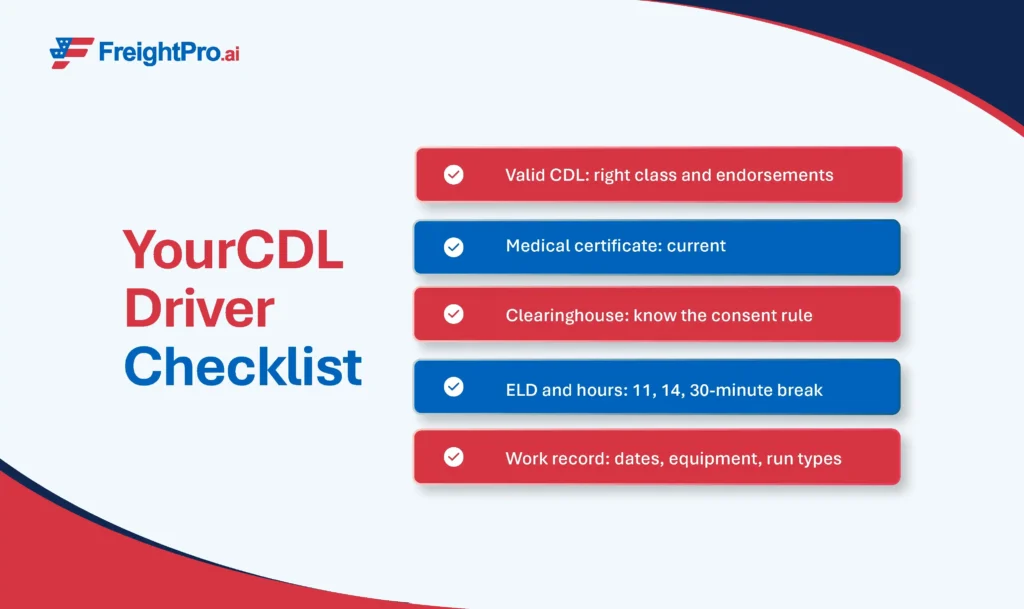
| Checklist item | What to confirm | Where to check |
| Valid CDL | Correct class (A, B, or C) and the endorsements your job needs | FMCSA CDL program and your state licensing agency |
| Medical certificate | Current and on hand | FMCSA medical forms |
| Clearinghouse | You know a carrier needs your consent to view your record | Clearinghouse driver page |
| ELD and hours | Your device is listed, and you know the 11, 14, and 30-minute rules | Registered ELD list |
| Work record | Dates, equipment, run types, and endorsements ready to share | Your own records |
Carriers run their own screening steps before a driver starts, and FreightPro’s recruiting guide covers what carriers screen for. Knowing the list in advance helps you prepare your records.
How does FreightPro support CDL drivers on the job search and on the road?
FreightPro is a trucking ecosystem for CDL drivers across Class A, B, and C, with jobs, truck-focused maps, and a community in one app. It is free to download on iPhone and Android, with a web version too.
- Jobs: Fit-based job matching shows a fit score, and pay and benefits are shown up front. Browse local, regional, and OTR jobs and apply in the app. Your profile carries your experience, endorsements, equipment, run type, and your pay and home-time expectations, and you can add a video introduction. That gives you visibility to 1000’s of quality carriers, and an accurate profile matters because carriers filter on those details, as the guide on how carriers search for experienced drivers explains.
- Truckers community. A social feed carries posts and short videos from drivers, and you can follow drivers, owner-operators, and companies. Meet shows drivers nearby, and local meetups put you in the same room as them.
- On the road. Truck-focused turn-by-turn navigation, multi-day trip planning, live traffic and weather, offline maps, and break planning sit next to truck stops on the map. Weigh station status and truck parking availability are reported by drivers.
Questions about the app? Reach the team through Contact Us.

Frequently asked questions
1. Can an employer see my Clearinghouse record without my permission?
No. A carrier needs your consent before it can view your Clearinghouse record. If you do not consent to a query, you are prohibited from performing safety-sensitive functions for the employer that requested it. If you think your record is wrong, you can submit a DataQs petition or request a correction under the Privacy Act.
2. How long do I have to file a coercion complaint against a carrier?
You have 90 days from the alleged coercion. FMCSA requires the complaint in writing, and you can file it through FMCSA’s online NCCDB complaint system or by mail to the FMCSA Division Office in the state where you work. Include supporting details such as texts, emails, and the names of any witnesses.
3. Which truck driver apps show weigh stations and truck parking?
Trucker Path locates weigh stations, truck parking, and CAT scales, and Drivewyze detects weigh stations and requests bypasses. FreightPro shows weigh station status and truck parking availability reported by drivers. Features change, so confirm what each app offers in its App Store or Google Play listing before you rely on it.
4. What documents should I keep ready for my CDL driver checklist?
Keep your CDL, your current medical examiner’s certificate, and a clear record of your endorsements, equipment experience, and work history. A carrier also needs your consent before viewing your Clearinghouse record. FMCSA’s driver resources page links to the CDL program and medical forms if you need to confirm a requirement.
5. Where can I find CDL resources for Class B and Class C drivers?
FMCSA’s CDL program page covers federal licensing standards for all three classes. Your state licensing agency issues the license and confirms state rules, and FMCSA’s entry-level driver training page explains training requirements for new drivers. FreightPro supports CDL drivers across Class A, B, and C.